
Study Notes
Study Notes generates a complete, structured set of notes from your lecture recording; it's built using evidence-based note-taking techniques rather than a generic AI summary.
Study Notes is built on Genio's CORA framework (Capture, Organise, Refine, Apply) and the broader ECRA learning journey (Engage, Comprehend, Retain, Apply). You'll get a structured starting point, not a finished product, avoiding the "fluency illusion" where receipt of notes is mistaken for genuine understanding.
The output is grounded in your transcript; the content reflects only what was said in your recording, with no AI-generated inference or invented content.
Info - Study Notes is currently only available if you get access to Genio Notes through your institution.
To get your Study Notes, you'll need to record/import your audio and create your transcript; this is used as the basis for your notes.
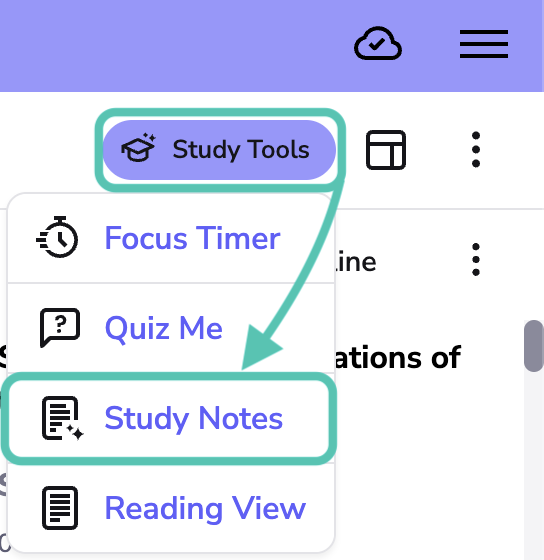
- Click the Study Tools button
-
Select Study Notes
- Choose which style of notes you prefer (Bullet Notes or Cornell Notes)
- If you chose Cornell Notes, choose whether to write your own Cues and Summary or generate complete notes.
- Click Generate

Once you've generated your notes, you can jump straight into a Quiz by using the button at the bottom of the page.
Info - You can generate each of the different types of Notes and switch between them.
Bullet Notes
Bullet Notes creates a concise summary of your recording. You can use the copy icon in the top right to copy your content and then paste it back into Genio Notes, or any other application, to continue your studies.
Or use the QuizMe button to test yourself on the content.

Cornell Notes
Cornell Notes organises your lecture into the Cornell format: cues down the side, main notes in the centre and a summary at the bottom. When you generate Cornell Notes, you can choose how much of the template Genio fills in for you:

Writing them yourself
Genio creates the Main Notes from your transcript and leaves the Cues and Summary sections blank for you to complete. Writing these yourself is one of the most effective ways to understand and remember what you've learned.

To complete the table, copy and paste your notes into another application, or print them. If you print them as a PDF, you can import the PDF into a new Genio Notes event and use the slide annotation tools to complete the table.
You can also click the QuizMe button at the bottom to test yourself on the content.
Genio Notes generates them for you
Genio fills in every section of the template from your transcript:
- Cues: questions and keywords to help you test your recall
- Main Notes: the key points from your lecture, organised into sections
- Summary: a short overview of the whole recording
Your notes are ready to review as soon as they're generated. To get the most from them, cover the Main Notes and use the Cues to test what you remember, then try rewriting the Summary in your own words.

You can also click the QuizMe button to test yourself on the content.